
Online Tutor Marking Service
Getting the most from Gigajam
We want you to get the most from your lessons. This page is designed to provide some quick support for using our Online Tutor Marking Service, powered by YouTube. If you need anything from us at all, then please always feel free to just email us at support@gigajam.com.
We are keen to get you up and running and enjoying learning to play with Gigajam.
Brian Greene |CEO/Founder
Online Tutor Marking – YouTube Videos
Guitar, Bass, Piano and Acoustic Drums
For students who are learning with an acoustic instrument, such as a piano, drum kit, as well as electric instruments such as guitar and bass, then you can receive feedback and scores by using our Online Tutor Marking Service – You Tube Videos.
Tablets, Phones and MAC OS
Gigajam’s automated Xtractor/Analyser software is only available on Windows. If you have a smartphone, tablet or MAC os, then you can receive feedback and scores by using our Online Tutor Marking Service – You Tube Videos.
How to use our Online Tutor marking Service
You can record and upload performances of any exercise up to a YouTube account and place the link in your portfolio.
- Simply video a performance of your playing along to the Gigajam audio player track. It provides the correct length and a count in so you can start correctly.
- Upload the video to YouTube as a standard video (video shorts cannot be shared on our platform) and mark your video as unlisted (recommended) for privacy.
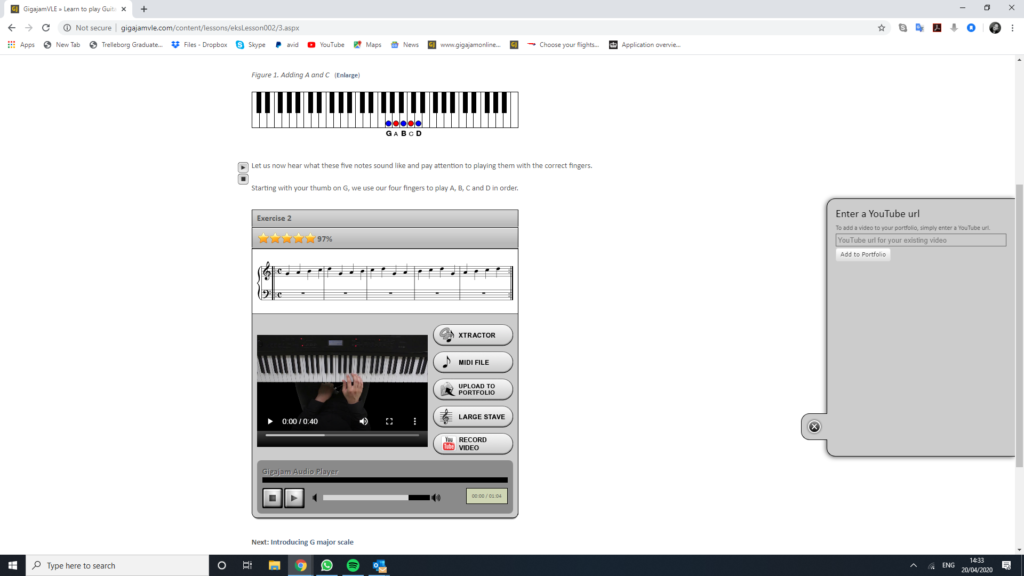
- Copy the link to the video and place the link in the youtube widget next to the exercise in your lesson, or the graded piece you have performed (see picture/click to enlarge). Sometimes when copying the link the share service doesn’t work – please use the link to your video from the browser in that case.
- Your tutor will be informed of the upload and will mark the video. Your tutor will give you a percentage score and feedback comments to say: “what worked well” and what would be “even better if”.
- The scores gained will be stored in your portfolio with Gigajam.
More support in using Gigajam can be found on our support page here
**Please note, that Youtube periodically change functionality.
Please use Standard videos and not Video Shorts
You may need to copy the link to your video from the browser rather than use the share function.
Click on the image to enlarge
Any questions - Just ask
Email us and we will respond certainly within 24 hours and often much more quickly.